ALE IP Desktop Softphone11.3.7
Publisher Description
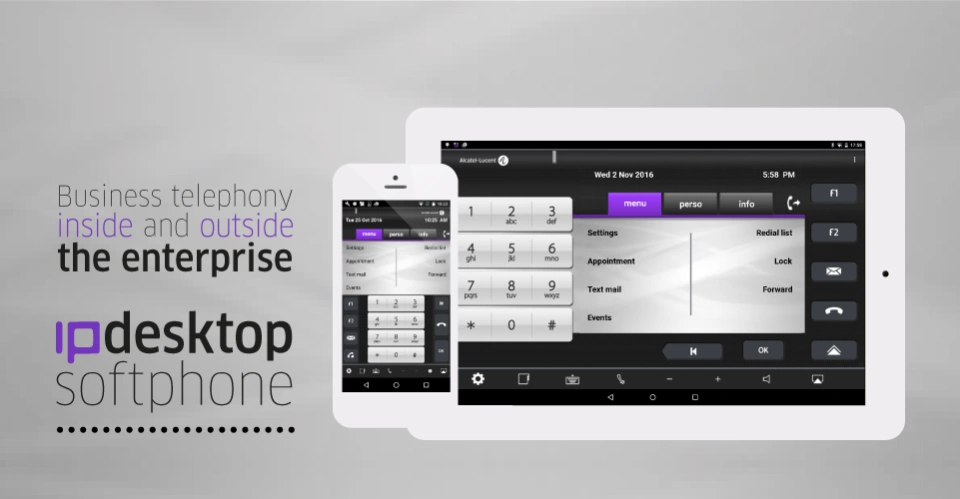

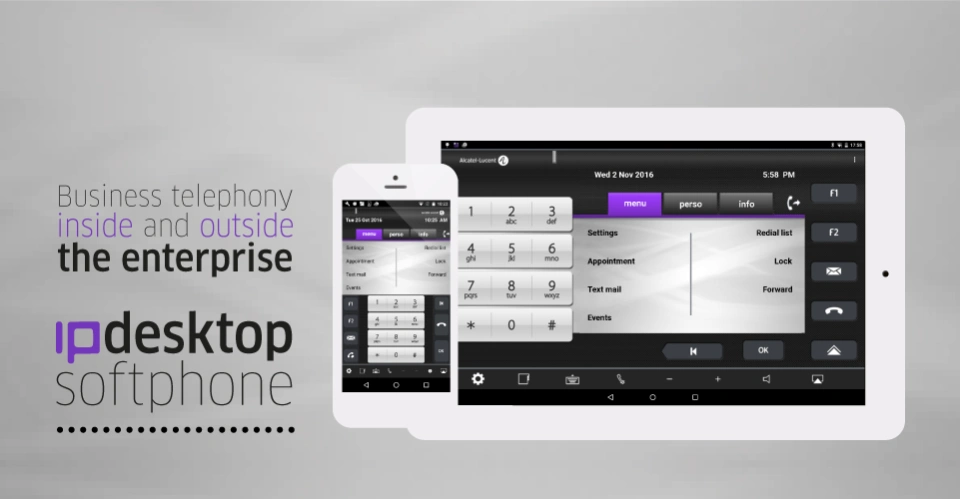
This is an emulation of the IP Touch 8068 Premium Desk Phone.
ALCATEL-LUCENT IP DESKTOP SOFTPHONE
Installed on an Android tablet and smartphones(*), this application offers business voice communications to on-site and remote workers through an emulation of the Alcatel-Lucent 8068 Premium DeskPhone.
CUSTOMER BENEFITS:
- Fully-integrated telephony solution
- Quick and user-friendly access to telephone features
- Smart DeskPhones user experience for fast adoption
- Optimization of employees’ productivity
- Easy integration of on-site and remote workers
- Carbon footprint reduction
- Communications, connectivity and hardware costs control
FEATURES:
- VoIP protocol of the Alcatel-Lucent OmniPCX Enterprise/Office provides voice communications on the tablet or smartphone
- Available on-site on WiFi
- Available off-site anywhere the user is able to connect to the company’s IP network via a VPN (works on WiFi, 3G/4G cellular)
- G.711, G722 and G.729 codecs are supported
- Business or Contact Center mode
- Horizontal/vertical flip
- Similar layout and keys as the Alcatel-Lucent Smart DeskPhones
- Multilanguage interface:
o Softphone display panel: the same languages as the 8068 Premium DeskPhone
o Application settings menu: English, French, Spanish, Italian, German and Arabic languages are supported
OPERATIONAL DETAILS:
- IP Desktop Softphone license per user required on the Alcatel-Lucent OmniPCX Enterprise/Office. Please contact your Alcatel-Lucent Business Partner to get these licenses.
- Minimum requirement: Android OS 8.0
- The installation, administration and user manuals are available from your Alcatel-Lucent Business Partner on the Alcatel-Lucent Technical Documentation Library
- Support URL: https://businessportal.alcatel-lucent.com
(*) For the list of supported devices, please refer to the “Services Assets Cross Compatibility” document available from your Alcatel-Lucent Business Partner.
About ALE IP Desktop Softphone
The company that develops ALE IP Desktop Softphone is Alcatel-Lucent Enterprise - ALUE. The latest version released by its developer is 11.3.7. This app was rated by 4 users of our site and has an average rating of 2.9.
To install ALE IP Desktop Softphone on your Android device, just click the green Continue To App button above to start the installation process. The app is listed on our website since 2024-11-19 and was downloaded 3,387 times. We have already checked if the download link is safe, however for your own protection we recommend that you scan the downloaded app with your antivirus. Your antivirus may detect the ALE IP Desktop Softphone as malware as malware if the download link to com.alu.proserv.ipdsp is broken.
How to install ALE IP Desktop Softphone on your Android device:
- Click on the Continue To App button on our website. This will redirect you to Google Play.
- Once the ALE IP Desktop Softphone is shown in the Google Play listing of your Android device, you can start its download and installation. Tap on the Install button located below the search bar and to the right of the app icon.
- A pop-up window with the permissions required by ALE IP Desktop Softphone will be shown. Click on Accept to continue the process.
- ALE IP Desktop Softphone will be downloaded onto your device, displaying a progress. Once the download completes, the installation will start and you'll get a notification after the installation is finished.
Program Details
System requirements
Download information
Pricing
Version History
version 11.3.7
posted on 2024-11-19
Compliant with Google Play Policies
Correction of bugs
version 11.2.1
posted on 2023-12-11
Implementation of getnoeversion
Integrate new Squale to fix a vulnerability in embedded openSSL
version 11.2.0
posted on 2023-05-05
Native encryption including DTLS support
Connection to PCS
version 11.1.48
posted on 2022-11-10
- Squale version : 2.6.030.013
- Corrected Bugs:
CRIPDSP-617 Automatic Reconnection of IPDSP Android not working
CRIPDSP-629 IPSDP: Extension out of service / Android on
- Restrictions: Not compatible Android 8.1
version 11.1.41
posted on 2021-04-06
- new popup for incoming call with big buttons
- Make call from an third party application on Android
- fix bugs
version 11.1.40
posted on 2021-02-12
- new popup for incoming call with big buttons
- Make call from an third party application on Android
version 11.1.39
posted on 2020-11-19
- Systematic crash of IPDSP when automatic restart of application enable...
- IPSDP does not work when switching from mobile wlan to mobile 4G/LTE
- IPDSP receives an incoming call and does not play the melody.
- IPDSP Mobile changes of MAC on different internet connections.
- Crash IPDSP when answering incomming call on android
- Ringing Tone is not played while has a incoming call on IPDSP for Android 11.1.38
- IPDSP is not registering when switching over from WiFi to 4G mobile and vice versa
version
posted on 2020-06-08
Fixing bugs:
- IPDSP on OXO Ring tone is not played on Incoming Call
- No ringing audio during Incomming Calls on IPDSP for Android
- No Ringing on incomming calls on IPDSP for Android 11.1.34 & OXO R3.2
- IPDSP on Android does not Ring for incoming calls on OXO
- For OXO, IPDSP Windows "Executive Type Ringing Cadence" or "Priority Call Cadence No " does not work.
- Internal and External melody is playing in fast mode
- icon status not update when line is on hold if keys is on AOM module
version
posted on 2019-11-25
- Ringing Cadence
- Notification actions
- REDIRECT enhancement
- Fixed bugs
version 11.1.31
posted on 2019-10-01
Fixed Bugs
